Showing posts with label microsoft. Show all posts

Wednesday, June 5, 2019

Windows 10 Shares Data with Microsoft Insecurely

Apart from the fact Windows 10 (Win10) is sending search data, even though I had disabled Cortana, it's also sending the data to Microsoft using certificates whose authenticity aren't proven.


First, Kaspersky intercepted this traffic going to: dubaivm1.uaenorth.cloudapp.azure.com
It's obviously owned by Microsoft. Details about its usage are in the Detailed Report below.

There's an additional connection that goes to: exo-ring.msedge.net
This is also related to Cortana search. (which is disabled)


These are details of the certificate. It's signed by DigiCert to Microsoft CA, then to: azwanp.trafficmanager.net


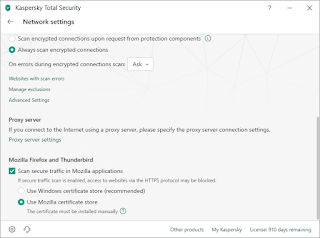
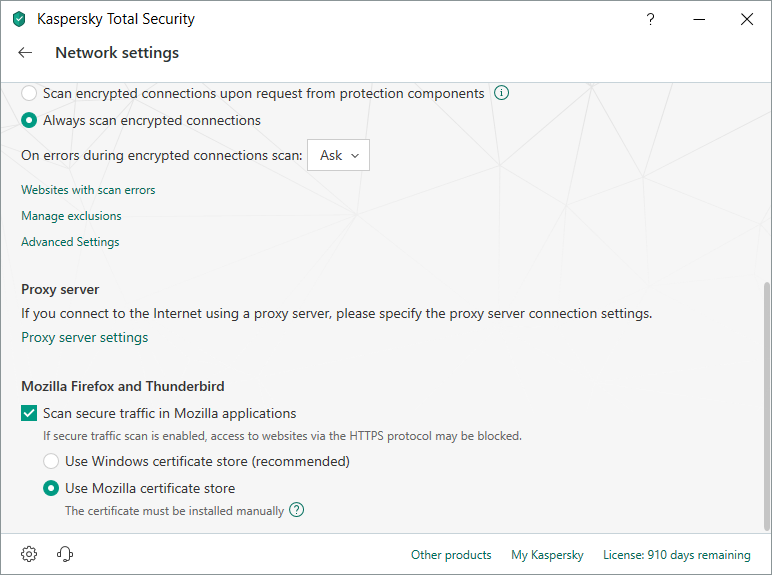
As extra precaution, I have Kaspersky set to use Mozilla's certificate store rather than Microsoft's.  At least I can trust that Mozilla won't inject stuff behind my back.


Monday, February 14, 2011

P2V Conversion of OEM Windows Systems

A physical to virtual conversion of a machine running an Original Equipment Manufacturer (OEM) Windows license will not be without hiccups.

Because the OEM validates the product key against the hardware itself, after the conversion process, the validation program will not find any OEM hardware thus rejecting all keys, even the standard ones. This is true for desktops, laptops and servers.

If you don't know what OEM is, it's similar to buying a Lenovo laptop with Windows preinstalled on it. In this case, all the hardware was provided by one manufacturer and the operating system (OS) will validate against the OEM hardware only.

The only solution is to obtain a Volume Licensing media of the same OS and a product key for it, then perform an OS repair (not using the recovery console).

Simply put, you boot up from the media, proceed as if you want to install, then select the partition that has been detected to have an existing OS and select Repair rather than a fresh installation.

All your settings and configurations will be preserved for your programs. You may need to reinstall certain hot fixes or a service pack.

Note: If setup cannot see the SCSI hard disk (in case of Windows XP), see this KB.

References:

Sunday, January 31, 2010

Google To Phase Out IE6 Support

As received by email: (emphasis is mine)

Dear Google Apps admin,​

In order to continue to improve our products and deliver more sophisticated features and performance, we are harnessing some of the latest improvements in web browser technology. This includes faster JavaScript processing and new standards like HTML5. As a result, over the course of 2010, we will be phasing out support for Microsoft Internet Explorer 6.0 as well as other older browsers that are not supported by their own manufacturers.

We plan to begin phasing out support of these older browsers on the Google Docs suite and the Google Sites editor on March 1, 2010. After that point, certain functionality within these applications may have higher latency and may not work correctly in these older browsers. Later in 2010, we will start to phase out support for these browsers for Google Mail and Google Calendar.

Google Apps will continue to support Internet Explorer 7.0 and above, Firefox 3.0 and above, Google Chrome 4.0 and above, and Safari 3.0 and above.

Starting next week, users on these older browsers will see a message in Google Docs and the Google Sites editor explaining this change and asking them to upgrade their browser. We will also alert you again closer to March 1 to remind you of this change.

In 2009, the Google Apps team delivered more than 100 improvements to enhance your product experience. We are aiming to beat that in 2010 and continue to deliver the best and most innovative collaboration products for businesses.

Thank you for your continued support!

Sincerely,

The Google Apps team

A subtle sucker-punch to Microsoft for not supporting their own products, while still supporting Firefox 3.0. I thought FF 3.0 would be phased out too!

As for Chrome, as far as I know the stable version is 3.x while 4.x is beta, but I could be wrong.

Thursday, March 5, 2009

HotZift: A Sprinkle of Free Frustration

Microzift (Microsoft - soft + garbage) just can't have enough frustrated people using its products. I think Bill Gate's cash is generated by selling anti-depressants and assigning its hell-desk (help desk) drones to Suicide Hot Lines!!!

I was subscribed to some groups without my consent. I emailed Google about this last week and got no response while still being spammed at my old Hotmail account. So I read Google's help pages again and saw that if you email the +unsubscribe@googlegroups.com you get unsubscribed automatically!

So click on one of the spam emails to see the address of the sender and then copy the email: groupname@googlegroups.com, then I paste it in the To field.

When I tried to click after the group's name to add '+unsubscribe' I couldn't!!! The email I already entered got highlighted and is no longer modifiable!

WHY???? GIVE ME ONE GOOD LOGICAL FREAKIN REASON!!!!


(Before you comment on why I keep using the dreadful hotzift: I keep this 10 year old account because most of my old buddies can only be reached through MSN and they don't login much and even if I email them my new email they're unlikely to open the email. So shut up.)

Monday, February 9, 2009

Fine-tuning Windows System Cache To Free Memory

Note: If you want the technical part only, go to the end of the post

Boring Intro


Our retail software is built on top of Visual Basic (yuck!) and main server replicates with 7 other servers that hold sub-databases.

The main server is a quad-core IBM X3400 with 6GB of RAM running Windows Server 2003 Enterprise x64. This is a new system that replaced an old server that crashed a while back. The old server ran on Windows 2000 Server with 4GB of RAM, but the data was stored on a Storage Area Network (SAN).

After moving to the new box, the dude "administrating" it kept restarting it on a daily basis saying that the server was "too slow" and that it didn't have enough memory (!!!). Later on, one of the people at the implementing company said that the server wasn't good.

I could let you live if you say a server that I built is slow, but saying it isn't good ... you just dug your own grave dude... I emailed one angry email at both the administrator and the no-good fella, CCed to my manager, accusing them of meaningless restarts and claiming that my server isn't good and that it's hardware fault, without ANY proof.

Of course, because I'm right, none of them replied, but sneakily they purchased extra RAM (2GB) behind my back, which is another big no-no. They didn't install the RAMs and were looking for someone (other than me) to do it for them.

Technical Part


It took me 5 minutes to identify the problem: During replication or at times were many files are open on the server, Windows caches these open files in the RAM (System Cache's responsibility).
According to the Help of Windows Task Manager: The System Cache shows the current physical memory used to map pages of open files.

Of course, Windows being itself, there's no direct way to tweak this properly, and after some search I found a registry key which can balance the usage of the System Cache and free up some RAM.

Go to HKEY_LOCAL_MACHINE\SYSTEM\CurrentControlSet\Services\lanmanserver\parameters and look for a REG-WORD data type named Size, which can have the following settings:

1 = Minimize Memory Used.
2 = Balance.
3 = Maximize Throughput for File Sharing and Maximize Throughput for Network Applications.

The default, as you might have guessed, is 3. I changed it to 2 but nothing changed until a server restart (typical).

I fired another email saying that I fixed the problem with a registry key, and went there and took the 2GB RAM for another server.

Why this didn't happen to the old server? I'm guessing that the SAN's cache was handling it properly and/or Windows 2000 Server was configured from the start to be a database host, which the new 2003 box apparently haven't.

Sunday, January 4, 2009

Scheduling a Task on Windows Per Minutes

Such an easy on job on Linux, turned out not so on Windows XP Pro and all I wanted to do is to export a process's info to a file every 5 minutes.

The Task Scheduler of Windows doesn't show you the option to run a periodical task per minutes.


After a quick search, I found out that it can be done in the command line interface (CLI).
C:\PsTools>schtasks /Create /SC MINUTE /MO 5 /TN javawatch /TR C:\PsTools\batch.bat
The task will be created under current logged-on user name ("ADRENALIN\Administr
ator").
Please enter the run as password for ADRENALIN\Administrator: ******
SUCCESS: The scheduled task "javawatch" has successfully been created.

After this, the task will show in your graphical task scheduler program:


You can see that the 5-minute interval is hard-coded into it!


As you can see in the CLI code, I'm pointing the task at a batch file. Contents of "batch.bat":
time /t >> java_watch.log
C:\PsTools\pslist.exe -m -e java >> java_watch.log

pslist is not a standard Windows tool but can be obtained for free here. It comes along with many other useful tools so make sure you check them out.

Anyway, I used pslist to extract memory info from a process called "java" -- you could omit the -e flag and just provide the process ID (PID).

Tuesday, December 23, 2008

Spreadsheets Maximum number of Rows

I had a spreadsheet (Excel sheet for you MS Office users) with over 253,000 entries. Since I run on Linux, I use OpenOffice.org's SpreadSheet program, which unfortunately supports a maximum of 65336 rows only.

A quick search got me to a comparison between multiple products that support more than that limit. OK, I lied. Two products only.

This Wikipedia page shows a nice table but people tend to overlook the tiny little IMPORTANT numbers used for special notes!!!

The products are: Microsoft Office 2007 and Gnumeric.

Unfortunately (yes, another unfortunate event), Gnumeric requires that you recompile it with max number of rows you desire. This can be a good thing if you look at it from the point that you can surpass the limit that Microsoft is boasting.

In all cases, opening such large sheets requires large memory. I'm guessing at least 1GB (for the data itself, not counting the program!). I'll test this claim on MS Office 2007.

Saturday, November 1, 2008

Choosing A Sub-notebook

My sister has been whining that the Lenovo laptop I got her is too big for her to carry around in college. Since she wanted something just to type word documents, do presentations and chat with, I showed her the Asus Eee PC models, and she loved them.

The available models were 7", 8.9" and 10" and luckily they sell these in Kuwait - Hawalli area - Ibn Khaldoun street. I took her so that she can see and relate to the sizes. The 10" was "big" so the debate was whether it's 7" or 8.9".

The difference between the 7" & 8.9" is the screen size and the disk capacity, but the dimensions of both are the same!

Linux or Windows?
Now, for a sub-notebook, you have very limited resources: 512MB-1GB of RAM, 8-30GB of disk space. And the choice of the Operating System makes a VERY big difference.

If you choose to go with the Windows model, you get Windows only, without Office and without an Anti-virus (which is a must). Office 2007 would kill the poor machine, and an anti-virus would make it unbearably slow.

So it's obvious that Linux is the proper choice for such small devices, and guess what? It does come with a set of applications pre-installed, including OpenOffice.org from which you can save as MS Word 2003 format, or export to PDF.

This doesn't apply to Asus only. For any device with limited resources (sub-notebook, PDA, tablet, Smartphone, Embedded devices) I hardly see how Windows would ever be a feasible solution.

Saturday, September 20, 2008

Death of The Floppy Drive

Or not!


Update [Mar 7 2009]: Advanced timings corrected
Update [Feb 14 2009]: I finally got the machine to stabilize. The shop had given me 2 kits of different voltages and Corsair's support helped me tweak the box to stability. Muchos Gracias Corsair!

I got a new machine, with one of the extreme motherboards: EVGA nVidia 790i Ultra SLI MCP. It supports many features, including a built-in RAID controller, which is the focus of this post.

I assembled the box, and configured the BIOS to enable the RAID controller on two SATA ports. I reboot, configure a RAID 0 array, reboot again and insert the Windows XP Pro 64-bit with SP2 CD, and it couldn't detect the RAID array that I had just created.

Reading about this problem a few months back, I remember that I need a floppy drive (which I didn't buy for this new box) and a floppy diskette. And another computer, with Windows on it, to use the RAID floppy maker tool from the motherboard's CD.
I managed to salvage a floppy drive from another machine, which also happens to have a Windows partition (luckily). I copy the tool to it and use an old driver diskette. The tool formats the diskette and puts the drivers on it. Great, I'm good to go now.

Well, not quite. Windows Setup didn't see the drivers on the floppy, for some reason. So I take the floppy to the other machine, format it from Windows, and then copy the drivers to it manually (there was a directory of the drivers extracted). Windows happily saw the new drivers.

After installing Windows, I installed the drivers on the box from the mobo's CD. Then I install the driver updates which I had downloaded from the Internet earlier during assembly. The update tool detected that there were previous drivers, and the new ones will be installed on the next boot, and it rebooted, but never booted!
The "smart" update tool deleted the old drivers, which included the RAID drivers, rendering my array inaccessible. The only way to fix this is by booting to Windows Setup and run a repair on the existing partition, which I did. The Setup froze during file copying. I boot again to Setup and this time run a new installation.

There are two parties to blame here: EVGA, the motherboard manufacturer, and Microsoft, the Operating System maker.
1) Microsoft: Seriously, I'm using the latest ORIGINAL Windows CD, why the hell won't you update the Setup program to allow mass storage devices like USB Memory sticks? THIS IS 2008! 1995 Says hi!!!

2) EVGA: You soar losers! You could've included a floppy with the WORKING drivers on them! AND put a warning (even if tiny) on the cover that a floppy drive is required if RAID is to be used!
What if this was my first machine to be built? How the hell am I supposed to make the RAID floppy?!

And in case you're wondering, no, I didn't get to install Windows successfully yet (with drivers). Whenever I install the drivers from the CD, it reboots & the array doesn't boot anymore. 3 failed installations, 1 failed repair due to freeze & another failed repair due to driver installation.
I'm attempting a different approach: Create a striped array of ONE disk, install OS, then migrate using the software tool from the CD (read that it's possible from the nVidia RAID Guide).
I'll update on the result.

P.S.: The floppy drive is not dead, yet. You can thank Microsoft for that.

update:
It finally worked!
1) Create bootable stripe array of one disk ONLY
2) Install OS to disk, using drivers from floppy -- reboot
3) Install drivers & programs from CD -- reboot
4) Install downloaded updated drivers and programs -- reboot
5) Use MediaShield program to migrate your array to a 2nd stripe disk (will take time -- DO NOT REBOOT!)

I had lockup issues where Windows would freeze randomly. After doing some search, I ended up updating the BIOS (from EVGA website) to P07, but the RAMs caused some lockups too, so I had to keep the clock settings to "auto", while manually setting the memory FSB to 1333MHz (it was detected as 1066) -- after consulting with Corsair, I've manually set the memory frequency, voltage, timing and SPP voltage.

Using 2 different kits of Corsair CM3X2048-1333C9DHX. The printed timings are: 9-9-9-24, but the voltage on the version 3.2 kit is 1.7v while the 1.2 version had its voltage rate set as 1.6v.

Stable settings: Confirmed on Feb 14 2009
Stable timings at 1066MHz are: 9-9-9-24 (2T)
Advanced memory settings (auto):
tRRD = 4
tRC = 27
tWR = 10
tWTR = 14
tFAW = 17
tREF = 7.7us
tRFC = 59


Voltage rate for SPP & Memory:
SPP = 1.40v
Memory = 1.80v


According to Corsair's support: Both memory kits are warranted up to 2.0 volts, so no need to worry. Also, Corsair support asked me to set the SPP voltage to +0.2 the default value, which is 1.5v but I tried 1.4 first and it was working fine, so I didn't try 1.5v.

BIOS flashing utility info:
For 132-CK-NF79-6A61MB02C-00     Date: 26/6/2008
Flash type: Winbond W39V080A Binary file name: nf79_p07.bin


After flashing new BIOS, when powering on, BIOS info:
Pheonix - AwardBIOS v6.00PG
6A61MB02 Release number 811N2P07
nVidia BIOS Version: 2.053.E8


MediaShield ROM info:
MediaShield ROM BIOS 9.85

Sunday, July 13, 2008

Microsoft Windows XP End-User License Agreement

For the sake of amusement, I decided to read Microsoft's Windows XP Professional End User License Agreement.

I have read the EULA and decided to write some comments, or just highlight some points.

Head start:
YOU AGREE TO BE BOUND BY THE TERMS OF THIS
EULA BY INSTALLING, COPYING, OR OTHERWISE USING THE PRODUCT. IF YOU DO NOT AGREE, DO
NOT INSTALL OR USE THE PRODUCT; YOU MAY RETURN IT TO YOUR PLACE OF PURCHASE FOR A
FULL REFUND.

  • Right. So, if you don't agree with ANY of the points, you're not allowed to use this piece of software.


Without prejudice to any other rights, Microsoft may cancel this EULA if you do not abide by the terms and conditions of this EULA, in which case you must destroy all copies of the Product and all of its component parts.

  • I would like to point out that there's no mention of the word "refund."


The Product may not be used by more than two (2) processors at any one time on any single Workstation Computer.

  • There's no mention of the word "cores," so by processor, they mean a physical chip. And God forbid you may have a dual processor motherboard and utilize both! I have seen some XP licenses that are valid for multiple CPUs. I don't know if they're referring to the whole computer or just a processor.


You may permit a maximum of ten (10) computers or other electronic devices (each a "Device") to connect to the Workstation Computer to utilize the services of the Product solely for File and Print services, Internet Information Services, and remote access (including connection sharing and telephony services). The ten connection maximum includes any indirect connections made through "multiplexing" or other software or hardware which pools or aggregates connections.

  • So if you live in a dorm, you can have only 10 friends. If you get naughty and make more than 10 friens, they'll be upset to know that you can't permit them to access your fancy collections over the network. And if you think that you're smart enough to have the computers pass through a single gateway to appear as a single computer, then you're performing an illegal operation, my naughty friend. Microsoft shall spank you!


Except as otherwise permitted by the NetMeeting, Remote Assistance, and Remote Desktop features described below, you may not use the Product to permit any Device to use, access, display or run other executable software residing on the Workstation Computer, nor may you permit any Device to use, access, display, or run the Product or Product's user interface, unless the Device has a separate license for the Product.

  • Is this still "my" computer?!


There are technological measures in this Product that are designed to prevent unlicensed or illegal use of the Product. You agree that we may use those measures.

  • It's within their right to protect their software, but wait till you get to the good part of this deal, below.


Microsoft reserves all rights not expressly granted to you in this EULA.

  • In other words: "All your base are belong to us!"


After upgrading, you may no longer use the product that formed the basis for your upgrade eligibility.

  • So if I upgrade from Windows98 to XP, I'm no longer allowed to use Win98, which I paid for? Delightful.
  • If I had to format, God forbid, how am I supposed to install XP without the right to install the base OS (Win98)?! (unless install doesn't count as using)


You may move the Product to a different Workstation Computer. After the transfer, you must completely remove the Product from the former Workstation Computer.

  • I thought it wasn't allowed. Good to know it is.


You may not rent, lease, lend or provide commercial hosting services to third parties with the Product.

  • To all of you little kids who had dreams of starting a tiny web-hosting service, now that you have an OS with a graphical interface and all, sorry to say that it's not going to happen! HAHA! In your face!


You agree that Microsoft and its affiliates may collect and use technical information gathered in any manner as part of the product support services provided to you, if any, related to the Product.

  • "in any manner" -- yup! They lived to that promise alright! But I have a hunch we'll be reading about yet more exciting new ways :D


You acknowledge and agree that Microsoft may automatically check the version of the Product and/or its components that you are utilizing and may provide upgrades or fixes to the Product that will be automatically downloaded to your Workstation Computer.

  • Does this mean, that by turning off the AutoUpdate service, I've violated the EULA?!
  • Does this mean, that Microsoft can check my system, even when I have AutoUpdate turned off and never visited their update site/portal?!
  • What if I don't want your fixes and updates (that might break certain parts of MY system)?


Content providers are using the digital rights management technology (“Microsoft DRM”) contained in this Product to protect the integrity of their content (“Secure Content”) so that their intellectual property, including copyright, in such content is not misappropriated. Owners of such Secure Content (“Secure Content Owners”) may, from time to time, request Microsoft to provide security related updates to the Microsoft DRM components of the Product (“Security Updates”) that may affect your ability to copy, display and/or play Secure Content through Microsoft software or third party applications that utilize Microsoft DRM. You therefore agree that, if you elect to download a license from the Internet which enables your use of Secure Content, Microsoft may, in conjunction with such license, also download onto your computer such Security Updates that a Secure Content Owner has requested that Microsoft distribute.

  • Oh? So at some point of time, the "Secure content" which I have paid for, could be rendered useless, because the provider felt like it's not secure enough?
  • I don't see the word "refund" in the text
  • This sounds more like Digital Restrictions Management


NOT FOR RESALE SOFTWARE. Product identified as “Not for Resale” or “NFR,” may not be resold,
transferred or used for any purpose other than demonstration, test or evaluation.

  • Hmmm... The original CD sitting in front me of Microsoft Windows Server 2003 R2 Enterprise Edition, has the following on it: "Not for retail or OEM Distribution. Not for resale." -- does this mean I may not use it in production environment and only for "demonstration, test or evaluation"?! I sure have paid for a production environment copy!
    Either the shipping elves sent me the wrong CD, or the EULA is mistaken...


11. LIMITED WARRANTY FOR PRODUCT ACQUIRED IN THE US AND CANADA.
Microsoft warrants that the Product will perform substantially in accordance with the accompanying materials for a period of ninety days from the date of receipt.
...
Any supplements or updates to the Product, including without limitation, any (if any) service packs or hot fixes provided to you after the expiration of the ninety day Limited Warranty period are not covered by any warranty or condition, express, implied or statutory.
...
This Limited Warranty is void if failure of the Product has resulted from accident, abuse, misapplication, abnormal use or a virus.
...
Microsoft’s and its suppliers’ entire liability and your exclusive remedy shall be, at Microsoft’s option from time to time exercised subject to applicable law, (a) return of the price paid (if any) for the Product, or (b) repair or replacement of the Product, that does not meet this Limited Warranty and that is returned to Microsoft with a copy of your receipt.
...
Outside the United States or Canada, neither these remedies nor any product support services offered by Microsoft are available without proof of purchase from an authorized international source.

  • Microsoft guarantees you its Operating System (OS) for 3 months only, because God knows what kind of viruses might be unleashed to masses to hijack their precious Windows-based machines after 3 months. Microsoft surely can't be held liable for that! Nor its poorly designed and unsecure OS!
  • Oh! Goody! Even their bug fixes aren't guaranteed! Fantabulous!
  • You're a financial controller at a big firm and you're almost done from the year's financial records to close it down, and to your misfortune, got infected by a Trojan Horse which exploited a security hole in Microsoft Windows Firewall. This not-so-friendly Trojan has corrupted your precious OS and you no longer have access to your files. Your company doesn't close on time and falls into financial problems. Who's fault is this? Who's responsible to pay for the damages?
  • Following the scenario above, you may not be so lucky to be granted Microsoft's love and get your $185 (imagine loss in millions). Or even better, they will give you another CD of the same OS! Yay! Oh .. I forgot to mention that you'll have to pay for shipping the CD you have to them first...
  • What about the 3 months period? How come it's not available to those outside US & Canada?!


Except for the Limited Warranty and to the maximum extent permitted by applicable law, Microsoft and its suppliers provide the Product and support services (if any) AS IS AND WITH ALL FAULTS, and hereby disclaim all other warranties and conditions, either express, implied or statutory, including, but not limited to, any (if any) implied warranties, duties or conditions of merchantability, of fitness for a particular purpose, of reliability or availability, of accuracy or completeness of responses, of results, of workmanlike effort, of lack of viruses, and of lack of negligence, all with regard to the Product, and the provision of or failure to provide support or other services, information, software, and related content through the Product or otherwise arising out of the use of the Product. ALSO, THERE IS NO WARRANTY OR CONDITION OF TITLE, QUIET ENJOYMENT, QUIET POSSESSION, CORRESPONDENCE TO
DESCRIPTION OR NON-INFRINGEMENT WITH REGARD TO THE PRODUCT.

  • It speaks for itself...


After these points, I don't know how you feel about your purchased copy of Windows, but it feels to me that I'm renting the software with a gun to my head, and my face glued with an awkward smile... (Glue made Microsoft, of course).