Showing posts with label review. Show all posts

Monday, January 27, 2020

Blockchain Council: Not Worth It

Introduction

Some time last year, I was seeing a lot of people talking about blockchain certification and others claiming to be certified experts. Being someone who's seen the start of it all since 2008, almost all these certifications smelled like scam.

I looked around and saw Blockchain Council being touted. I paid them to see what they're actually offering.

TL;DR Summary

The site is run by a single person who's showing off as an entrepreneur, but has no real product to show. The study material is very basic, filled with typos and mistakes, and the final exam has almost no relationship to the material and many of the questions weren't even part of the material; a trick to have you take the exam multiple times (and pay more).

Additionally, the site owner shoves his own product into the material to promote it, but doesn't include other competing products. That's quite unprofessional.

Even though the certificate says "Certified Blockchain Expert", the end result is that you're not an expert in any form. You'd only learn basics, that are available for free on the internet already.

Registration and Education Sites

The main site used to register is www.blockchain-council.org but after registration, you're redirected to another one www.toshacademy.com -- What is Tosh? Or better yet, Who is Tosh?


Self-Promotion and Ownership

Looking around for what and who owns the site, I found this: www.toshendra.com


Looking around for who Toshendra Sharma is, I found this article on Forbes India promoting him, even though there was no product to show for at the time, so what was the promotion and hyping the person for?!

Link: http://www.forbesindia.com/article/30-under-30/30-under-30-toshendra-sharma-a-messiah-for-cyber-security/42329/1

Link: https://www.forbes.com/profile/toshendra-kumar-sharma/

So what are his companies to deserve a mention on Forbes? The companies are defunct and dead. 2 sites are dead and no product was actually delivered and finished.
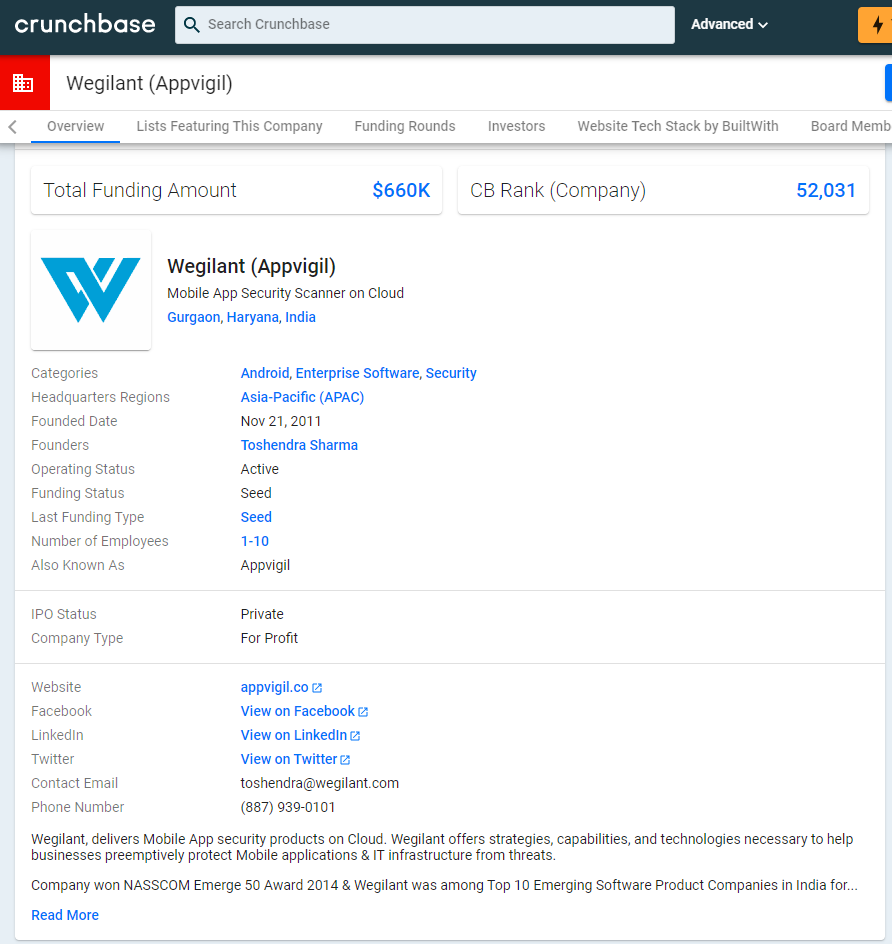
Link: https://www.crunchbase.com/organization/wegilant#section-overview

Typos

The typos are scattered across many slides, that it looks obvious the whole thing was cooked on a haste and not taken seriously nor professionally.

"Sierra Leone was among the first country" should've been "Sierra Leon was among the first countries"

"to conduct the same" -- the phrase "the same" is often used by people from from India. Not that there's anything wrong with Indians, but shows that the content was made by one individual, and he's likely to be Indian.

Notice the bullet points. The first one ends with a full-stop, but the others are left without one. No consistency.

"minor node" should've been "miner node."

"%tage" should've been written as "percentage" -- the fact it was written that way shows the level of unprofessional work.

"RecordsKeeper" is the product the creator of the site is trying to promote throughout the material.

In the blockchain architecture, one layer is shown as "insensitive layer" where it should be "incentive layer" -- I wasn't whether to laugh or cry when I was going over the material.

Worthless Certificate


I totally do not recommend wasting money on this nor fueling this terrible "business." -- I wouldn't label it as scam, but it's certainly not an "expert" body to judge people, and definitely not teach them.

Monday, August 13, 2018

RFID and NFC Blocking Wallets

Introduction

I've been on the lookout for a new wallet that blocks RFID/NFC frequencies to protect against scanners from people walking by you and scanning your cards' data.

Even though contactless cards have a limit set to allow payment without needing the pin, and if the limit is exceeding, a pin will be required, this limit varies from one country to another, and is enforced per transaction, not as a daily cap. So, if your card is cloned, the scammers can use it at different places throughout the day multiple times until you cancel/block the card with your bank.

Note: The pictures are taken with my OnePlus 5 phone's camera and are in no an indication of any product's quality. The camera isn't as good as that of Samsung or iPhone.

Finding The Right Wallet

My first attempt was to find one from mainstream wallet makers such as Mont Blanc and Prada, however, Prada didn't have any that block RFID/NFC and Mont Blanc only had one, but was bulky due to the big coin pouch in it.

My criteria:

  1. Minimalistic: thin & no coins.
  2. Fit big bank notes (height of 76 mm & length of 160 mm). I travel to Europe and Japan, and they have big bank notes.
  3. Fit at least 6 cards.
  4. Block RFIC/NFC.
  5. Don't bend cards.
  6. Look professional (not childish or cheap knockoff).


Attempt 0

Initially I found one on Amazon by Travando: Travando Money Clip RIO wallet. After using it for sometime, I wasn't really comfortable with it.

Pros:

  • Slim
  • Fits 6 internal cards & 1 external for quick access
  • Blocks RFID/NFC
  • Fits big money notes

Cons:
  • I never used a money clip approach before & I didn't like it at all. The money felt very exposed, so if you carry a lot of cash, you'd expose yourself in public when opening the wallet.
  • The wallet is lengthy and the cards get bent over time.
  • It didn't look professional enough, but this is a personal preference.
  • Because it's lengthy, it would sometimes bend one half away from the other, so over time, it'll damage the mid-section joining the two halves.
  • The money clip can't handle too much cash, so I had to slide in only half side and leave the other half out. This also helps getting specific bills out.

One thing as well: they're eco-friendly and use fake leather (faux leather), which is basically synthetic plastic/polymer material that feels like leather. It doesn't age, smell or scratch in a similar way, though. It also looks a bit different. This may or may not be to your liking.

Attempt 1

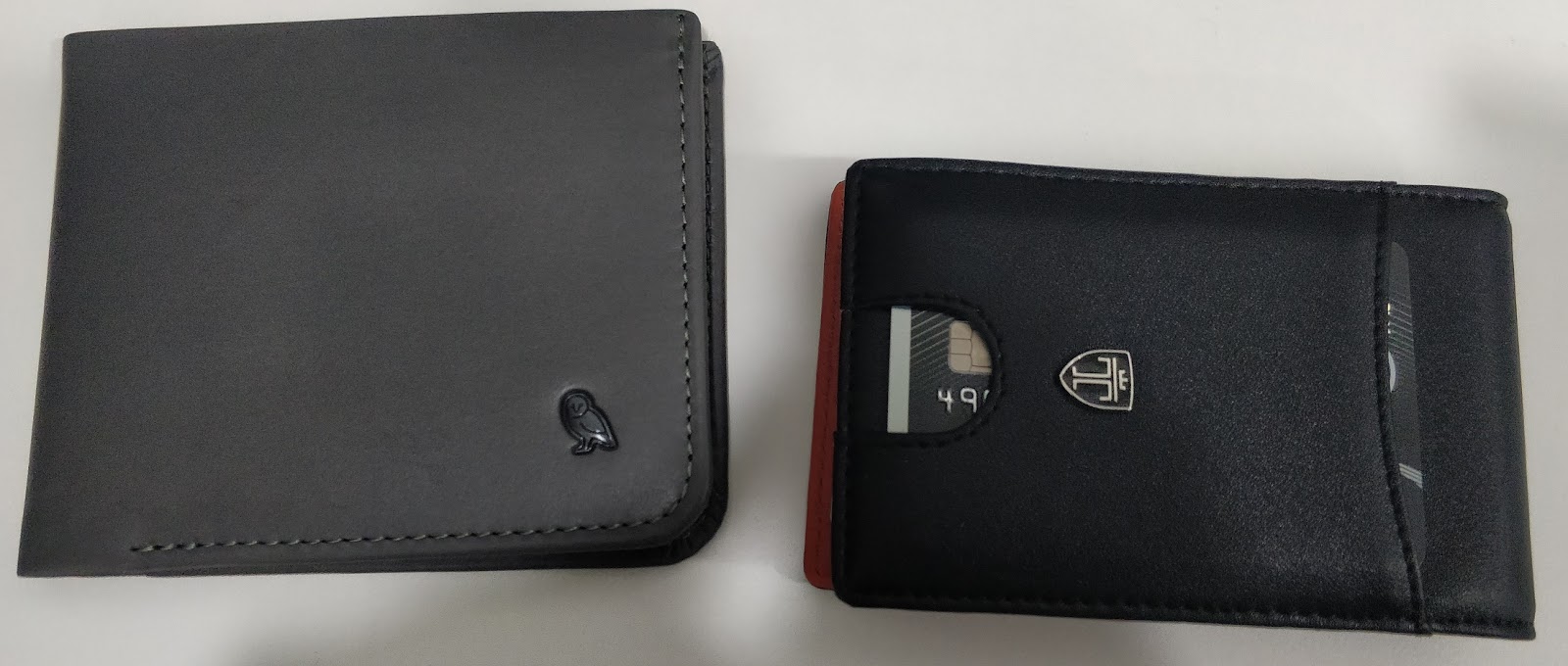
I kept looking and finally settled on Bellroy's Hide and Seek wallet (HI size for big bank notes). So far, I like it.

Pros:
  • Slim
  • Fits 4 quick use cards & 5+ cards in a group slot for stuff you don't use often
  • Blocks RFID/NFC
  • Fits lots of money
  • Has a hidden bank note/money section in addition to the main one
  • Hidden coin slot inside the hidden money section (a slot not a pouch)
  • Looks professional & smells good
  • Many options for colors
  • Cards don't bend and align properly when the wallet is pressed

Cons:
  • None so far. Will update if I face any.

Pictures


In the pictures above, I have 4 cards for quick access visible, and 4 others in the group pouch above the card on the left. There are many more slots available in the Bellroy. Check the link to their site to see more pictures.

Tuesday, September 11, 2012

Review: Pretec 8GB microSD Card

I bought this 8GB class 10 microSD card that also comes with an adapter from newegg for $8 (free delivery when choosing 5-7 day delivery). Pretec is a Taiwanese company.

The microSD card comes pre-formatted as FAT16 and preloaded with software for Android from a company called NQ Mobile:

  • Mobile Security: Protects against mobile viruses, trojans and spyware
    • Free features: anti-malware, Contacts backup, System optimization, Privacy Protection (checks app permissions), Traffic Manager
    • Premium: Anti-theft, Virus database update
  • Mobile Manager: Suite of tools for managing phone-related functions
    • Free: Call Manager (block calls/SMS), Backup Contacts, Erase call history/SMS
    • Premium: Hidden private space, spam database update
  • Mobile Booster: Smartphone performance optimization
    • Free: Single-key optimization, Task monitor, traffic monitor, power monitor, software manager, file manager
The sd card also comes with a Windows application for photo recovery and free recovery of 25 pictures, after which you have to pay.

The default capacity is 7.5GB, and the used capacity by the apps above is 20MB. fdisk output:
fdisk -l /dev/sdc

Disk /dev/sdc: 7964 MB, 7964983296 bytes
91 heads, 18 sectors/track, 9497 cylinders, total 15556608 sectors
Units = sectors of 1 * 512 = 512 bytes
Sector size (logical/physical): 512 bytes / 512 bytes
I/O size (minimum/optimal): 512 bytes / 512 bytes
Disk identifier: 0x00000000

   Device Boot      Start         End      Blocks   Id  System
/dev/sdc1            8192    15556607     7774208    6  FAT16

Writing 1GB to the sd card:

dd if=/dev/zero of=./test.dd bs=10M count=100
100+0 records in
100+0 records out
1048576000 bytes (1.0 GB) copied, 0.974053 s, 1.1 GB/s

Writing 100MB to the sd card with fdatasync enabled to avoid caching (realistic number for cameras):

dd if=/dev/zero of=./test.dd bs=10M count=10 conv=fdatasync
10+0 records in
10+0 records out
104857600 bytes (105 MB) copied, 8.36829 s, 12.5 MB/s

Writing 500MB to the sd card with fdatasync enabled:


dd if=/dev/zero of=./test.dd bs=10M count=50 conv=fdatasync
50+0 records in
50+0 records out
524288000 bytes (524 MB) copied, 63.5707 s, 8.2 MB/s

Putting ext4 instead of FAT16 on the card. First I changed the partition type using fdisk/cfdisk, then I used mkfs.ext4 with no options (defaults) on the partition.

mkfs.ext4 /dev/sdc1
mke2fs 1.42.5 (29-Jul-2012)
Filesystem label=
OS type: Linux
Block size=4096 (log=2)
Fragment size=4096 (log=2)
Stride=0 blocks, Stripe width=0 blocks
486720 inodes, 1943552 blocks
97177 blocks (5.00%) reserved for the super user
First data block=0
Maximum filesystem blocks=1992294400
60 block groups
32768 blocks per group, 32768 fragments per group
8112 inodes per group
Superblock backups stored on blocks:
        32768, 98304, 163840, 229376, 294912, 819200, 884736, 1605632

Allocating group tables: done                           
Writing inode tables: done                           
Creating journal (32768 blocks): done
Writing superblocks and filesystem accounting information: done
Now running the same write tests as above:

dd if=/dev/zero of=./test.dd bs=10M count=100             
100+0 records in
100+0 records out
1048576000 bytes (1.0 GB) copied, 0.698984 s, 1.5 GB/s

dd if=/dev/zero of=./test.dd bs=10M count=10 conv=fdatasync
10+0 records in
10+0 records out
104857600 bytes (105 MB) copied, 9.40124 s, 11.2 MB/s

dd if=/dev/zero of=./test.dd bs=10M count=50 conv=fdatasync
50+0 records in
50+0 records out
524288000 bytes (524 MB) copied, 42.9945 s, 12.2 MB/s

Now testing XFS file system:
mkfs.xfs -f /dev/sdc1
meta-data=/dev/sdc1              isize=256    agcount=4, agsize=485888 blks
         =                       sectsz=512   attr=2, projid32bit=0
data     =                       bsize=4096   blocks=1943552, imaxpct=25
         =                       sunit=0      swidth=0 blks
naming   =version 2              bsize=4096   ascii-ci=0
log      =internal log           bsize=4096   blocks=2560, version=2
         =                       sectsz=512   sunit=0 blks, lazy-count=1
realtime =none                   extsz=4096   blocks=0, rtextents=0

dd if=/dev/zero of=./test.dd bs=10M count=100              
100+0 records in
100+0 records out
1048576000 bytes (1.0 GB) copied, 0.590697 s, 1.8 GB/s

dd if=/dev/zero of=./test.dd bs=10M count=10 conv=fdatasync
10+0 records in
10+0 records out
104857600 bytes (105 MB) copied, 8.03924 s, 13.0 MB/s

dd if=/dev/zero of=./test.dd bs=10M count=50 conv=fdatasync
50+0 records in
50+0 records out
524288000 bytes (524 MB) copied, 42.0262 s, 12.5 MB/s


Unfortunately, there's no native exFAT driver for Linux so I cannot test the write speeds properly. exFAT is the filesystem used by some video cameras and is newer than FAT16.


In conclusion, the card does perform to the class 10 speed standards: a minimum of 10 MB/s. Your experience will vary depending on the filesystem you choose.

Note: Do not be fooled by the 1GB/s speeds. Those happened because my machine has l6GB RAM. Whenever a program writes to storage, the operating system will write to RAM then sync the data to disk, for the best performance. So, the more free memory you have, the better the performance.